
Technology Financing & Leasing for Schools
Â
We are dedicated to providing schools with the absolute best technology for their budget. We offer plenty of financing options for our accessories, software, laptop, and more to be utilized for educators and students. Our team will guide you through the many choices available when choosing a software licensing, network management or digital learning solution. When it comes to technology, our passion and commitment to the academic procurement process is unmatched.
ScholarBuys' Technology Financing & Funding Options
Chromebook Technology Offerings
Technology Leasing for Schools
The use of technology in education has grown exponentially in the past decade. This not only requires schools to implement more hardware in their classrooms, but also make sure they have strong network and security measures in place for all of this new technology. Even with the growth of new technology in education, some budgets have not yet expanded to adequately cover the costs. ScholarBuys provides a solution to schools to help stretch their budget and increase purchasing power. In this post, we will cover some of the costs schools are facing now with technology, and how leasing provides a viable solution to this cost.
$1Buy Out:Â With a $1 Buyout Purchase Option you own the equipment after your finance term is up. Once the leasing period is over, you buy out the equipment for $1. This is the best option if you are sure you would like to own the equipment and use it for a long time after the finance term, but want to pay for it in increments. If you want to keep your technology updated and get new products every few years, this is not the option for you.
Fair Market Value:Â A Fair Market Value Lease gives you the ability to purchase the product at any time at fair market value. This is a good option if you want to test out the technology and basically rent it before you purchase. You can stop leasing and return the equipment at any time, continue leasing, or purchase it at fair market value. This option offers lower monthly payments than loans for lease-to-own financing.
ScholarBuys Chromebook Expertise
Chromebook Bundle
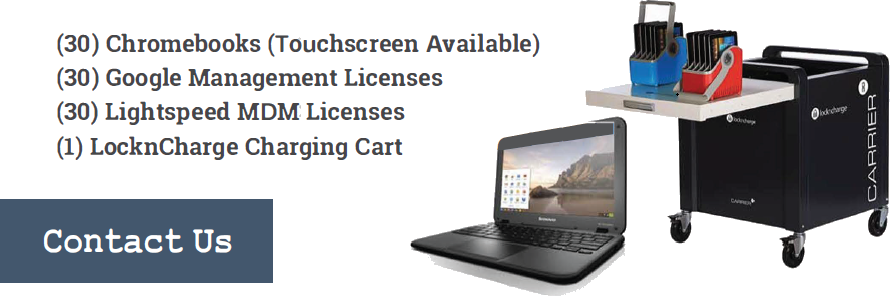
Chromebook devices come in all kinds of different models. ScholarBuys will guide you through the various offerings available to your school and find the perfect Chromebook solution to fit your needs. A standard bundle includes 30 Chromebooks, 30 Google Admin licenses, 30 content filtering licenses, and a charging cart. You also have the ability to customize the bundle to best fit the needs of your current project.
Chromebook Refresh
A Chromebook Refresh is when you remove your current Chromebooks from use and start fresh with a new fleet of devices. This ensures that your students are using the latest technology and also removes any broken or damaged devices from use. Our team of Academic Technology Experts at ScholarBuys can walk you through the Chromebook Refresh process. We have a Buyback Program to help you sell back old devices that you are no longer using. We also have expert knowledge in current education devices on the market that would be best for your school.
Device Buyback
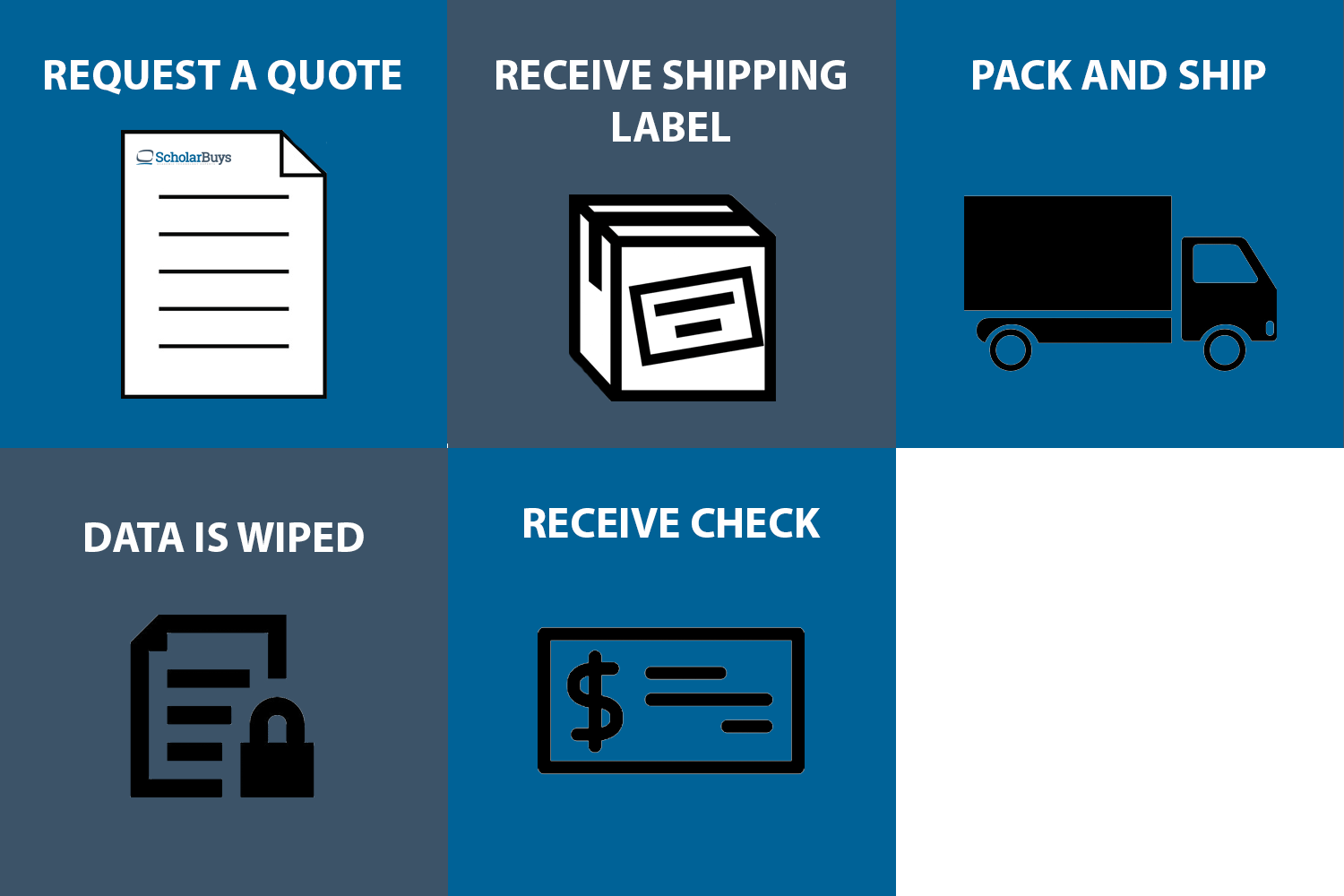
The process is simple! Let us know how many of the Chromebooks you have and we will send you a quote for how much they are worth. If you choose to have them purchased you get a shipping label, pack them up and send them in. Then, all data is wiped from the devices. As long as they still power on and have a non-cracked display, you will receive the quoted credit for the device. All quotes are valid for 30 days. Once all devices are processed you will receive a check in the mail for your earnings!
When should a school refresh its Chromebooks?
Most schools plan a refresh around each model’s Auto Update Expiration (AUE) date, the point when Google stops sending automatic updates to that device. Google provides 10 years of automatic updates from the date a Chromebook platform was released, not the date your school bought it, so a model that has been on the market for a few years arrives with less runway. For some older models, IT has to opt in to the extended updates in the Google Admin console, which also shows the AUE date for every device in your fleet. Battery life, repair rates, and whether devices still run your testing and instructional apps matter too. When repair tickets climb well before the AUE date, it’s time to plan the next fleet.
How does a Chromebook refresh work?
Here’s how a typical refresh runs for a middle school replacing a cart-based fleet ahead of its AUE date.
- The technology director pulls AUE dates and repair history from the Google Admin console and decides which carts to replace first.
- Our K-12 team recommends current models that fit the school’s apps, testing needs, and timeline. We then build a bundle with Chrome Education Upgrade licenses, filtering, and carts.
- The school chooses how to pay: an outright purchase, or a lease that spreads payments over the life of the fleet.
- The new Chromebooks arrive and are enrolled in the school’s Google Admin console, so existing settings and filtering policies carry over to the new fleet.
- Once the new devices are in classrooms, IT removes the old ones from management, and we quote them for buyback.
- The old devices ship back on a prepaid label and their data is wiped. The school is then paid for every device that qualifies.
How Can We Help?
At ScholarBuys, we pride ourselves on not only bringing you a great price that is budget conscious, but more importantly, we provide the highest level of customer service in the industry. We understand the unique needs of the education market and we are looking for strategic partners where we can enhance the level of education that they are able to provide to their student body. Please let us know how we can help you succeed.
- (877) 999-9294
- [email protected]
- 672 West Main Street, #1120, Lake Geneva, WI 53147
"*" indicates required fields